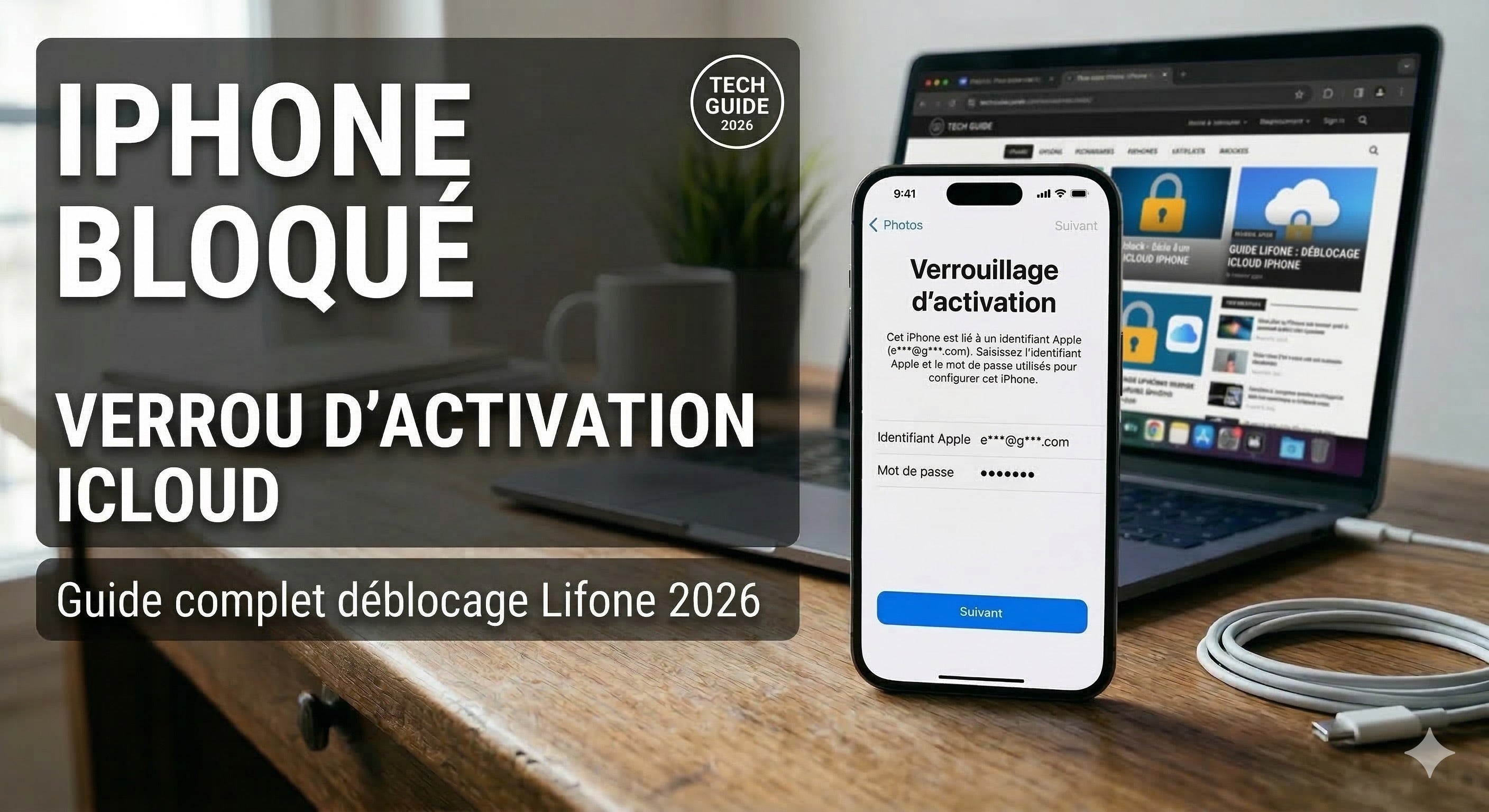
Quick Answer: To unlock an iCloud-locked iPhone, you need the Apple ID and password associated with the device. If you've forgotten them, go to iforgot.apple.com to recover them. If the iPhone belonged to someone else, only the previous owner can remove the lock—or Apple with proof of purchase.
Does your iPhone display a screen asking for an Apple ID you don't recognize? Did you buy a used iPhone and can't set it up? Have you forgotten your iCloud password after a factory reset?
This guide explains how iCloud Activation Lock works, why it exists, and all official and legitimate methods to remove it depending on your situation.
🚨 Important Warning: Activation Lock is an anti-theft protection designed by Apple. Third-party tools that claim to bypass it without an Apple ID are either ineffective on recent iPhones, involve jailbreaking which voids the warranty and weakens the device, or are illegal if the iPhone is stolen. This guide only covers official and legitimate methods.
Table of Contents
- What is iCloud Activation Lock?
- Why is my iPhone iCloud locked?
- Method 1 – Enter the Apple ID directly on the iPhone
- Method 2 – Recover your forgotten iCloud password
- Method 3 – Remove the device from iCloud.com
- Method 4 – Contact the previous owner (used iPhone)
- Method 5 – Contact Apple Support with proof of purchase
- How to check if an iPhone is locked before buying it
- How to avoid the problem: disable "Find My" before selling
- FAQ
1. What is iCloud Activation Lock?
Activation Lock is an Apple security feature that automatically activates as soon as you turn on "Find My iPhone" on a device.
Specifically, it permanently links the iPhone to your Apple ID. From that moment on, no one can use, reset, or reactivate the iPhone without entering the Apple ID and password of the owner — even after a complete factory reset.
It's a very effective anti-theft protection: if your iPhone is stolen and reset, it will be unusable without your credentials. However, it is also the primary source of problems when purchasing poorly prepared used iPhones.
Activation Lock applies to:
- All iPhones running iOS 7 and later versions
- All compatible iPads, iPod Touches, and Apple Watches
- It activates automatically if "Find My" is enabled
2. Why is my iPhone iCloud locked?
There are three main situations:
Situation A — You forgot your Apple ID or password
After a reset or phone change, the iPhone asks for the credentials of the connected iCloud account. If you've forgotten them, the device remains locked.
Situation B — You bought a poorly prepared used iPhone
The previous owner did not disable "Find My" or disconnect their iCloud account before selling the device. This is the most common case — and unfortunately also a sign of an unserious or even fraudulent sale if the iPhone was stolen.
Situation C — The iPhone has been reported lost or stolen
If the owner put the iPhone in "Lost Mode" via iCloud.com, the device will display a lock message with the owner's contact information. In this case, only the legitimate owner can lift the lock.
⚠️ If you bought a used iPhone that is iCloud locked: This may indicate that the iPhone was stolen. Before investing time or money trying to unlock it, check the device status via the IMEI number (accessible by dialing *#06# if the screen responds) on an official verification service.
3. Method 1 – Enter the Apple ID directly on the iPhone
For whom: you know the Apple ID associated with the iPhone.
This is the simplest solution and the only 100% reliable method on all models.
- On the iCloud lock screen, enter the associated Apple ID email address.
- Enter the corresponding password.
- Validate — the iPhone unlocks, and you can set it up normally ✅
If you can't remember the email address used, try all your usual email addresses. The Apple ID can be any address, not necessarily an Apple address.
4. Method 2 – Recover your forgotten iCloud password
For whom: you know your Apple ID email but have forgotten the password.
- From a computer or another device, go to iforgot.apple.com
- Enter your Apple ID email address
- Choose the recovery method:
- By email: a reset link is sent to your recovery email address
- By phone number: a code is sent via SMS to the registered trusted number
- Via another Apple device connected to the same account (iPhone, iPad, Mac)
- Follow the instructions to create a new password
- Go back to the locked iPhone and enter the new password ✅
💡 If you no longer have access to the recovery email or phone number: Apple offers an account recovery procedure ("Account Recovery") which may take several days. Go to iforgot.apple.com and follow the identity verification process.
5. Method 3 – Remove the device from iCloud.com
For whom: you have access to your iCloud account from a browser but not from the locked iPhone.
- Go to icloud.com/find from a browser
- Log in with your Apple ID and password
- Click on "All Devices" at the top of the map
- Select the iPhone to unlock from the list
- Click on "Remove This Device"
- Confirm — the activation lock is lifted ✅
- On the iPhone, proceed with the initial setup normally
⚠️ This method only works if you are the owner of the iCloud account associated with the iPhone and have access to that account.
6. Method 4 – Contact the previous owner (used iPhone)
For whom: you have purchased a used iPhone and it remains linked to the previous owner's account.
This is the only truly clean solution in this case. Contact the seller and ask them to do one of these two things:
Option A — They remove the iPhone from their account from iCloud.com
- The previous owner logs in to icloud.com/find
- They select the iPhone from their device list
- They click on "Remove This Device"
- The lock is lifted — you can configure the iPhone with your own account ✅
Option B — They log in to your iPhone to sign out
- On the lock screen, the previous owner enters their Apple ID
- Once unlocked, go to Settings → [their name] → Sign Out
- They sign out of their iCloud account
- Reset the iPhone: Settings → General → Transfer or Reset iPhone → Erase All Content and Settings
- The iPhone restarts without Activation Lock ✅
If the seller is unreachable or refuses, it's a serious red flag. An iPhone whose seller cannot remove the lock may be a stolen device.
7. Method 5 – Contact Apple Support with proof of purchase
For whom: you have proof of purchase for the iPhone but cannot access the associated iCloud account.
Apple can lift Activation Lock in certain cases, upon presentation of an official proof of purchase (Apple Store invoice, carrier receipt, online order form). This is not guaranteed, but it is the official route.
- Go to support.apple.com/en-us
- Choose "iPhone" → "Activation Lock"
- Start a conversation with an Apple advisor
- Explain the situation and provide your proof of purchase
- Apple reviews the request — processing times vary by case
💡 Alternative: You can also submit a request directly on support.apple.com/activation-lock, the dedicated form for Activation Lock.
8. How to check if an iPhone is locked before buying it
Before any used iPhone purchase, this check takes 2 minutes and can save you a lot of trouble.
Directly on the iPhone
- Ask to turn on the iPhone — if an "Activated by [email]" screen or an Apple ID request appears without being able to bypass it, the iPhone is locked.
- Check that the iPhone displays the normal home screen or the "Hello" initial setup screen without asking for an external iCloud account.
Checking "Find My" from Settings
If you have access to the configured iPhone:
- Settings → [owner's name] → Find My → Find My iPhone
- If "Find My iPhone" is disabled: Activation Lock is inactive ✅
- If "Find My iPhone" is enabled: Activation Lock is active — demand that the seller disables it before the sale
Checking via IMEI number
Services like imei.info or checkcoverage.apple.com allow you to check the activation status of an iPhone using its IMEI number. Dial *#06# to display the IMEI, or find it in Settings → General → About.
✅ At Lifone, all our refurbished iPhones are delivered without any Activation Lock. The old iCloud account is systematically disconnected before refurbishment. You receive an iPhone ready to set up with your own Apple ID, without any restrictions.
9. How to avoid the problem: disable "Find My" before selling
If you are selling or giving away your iPhone, you must follow these steps in order to free the device from Activation Lock:
- ✅ Back up your data (iCloud or Finder/iTunes)
- ✅ Disable "Find My iPhone": Settings → [your name] → Find My → Find My iPhone → Disable → enter your iCloud password
- ✅ Sign out of iCloud: Settings → [your name] → Sign Out → choose not to keep anything on the iPhone
- ✅ Reset the iPhone: Settings → General → Transfer or Reset iPhone → Erase All Content and Settings
- ✅ Verify that the "Hello" screen appears without asking for an Apple ID
A buyer who turns on the iPhone and sees the "Hello" screen can set up the device with their own account without any restrictions.
❓ FAQ – iPhone locked on iCloud
How to unlock an iCloud locked iPhone?
The only official way is to enter the Apple ID and password associated with the iPhone. If you've forgotten your password, go to iforgot.apple.com. If the iPhone belongs to someone else, only the previous owner can remove the lock from icloud.com/find by removing the device from their account, or Apple can intervene with proof of purchase.
Can an iCloud iPhone be unlocked without an Apple ID?
Officially, no. Activation Lock is designed to be ununlockable without the owner's credentials — that's its very principle. Third-party tools that claim to bypass this lock usually require jailbreaking (which voids the warranty and weakens iOS), have very limited success rates on recent iPhones (A12 and above), and can be illegal if the iPhone is stolen. The only legitimate way remains the account owner or Apple with proof of purchase.
I bought a used iPhone that is iCloud locked, what should I do?
Prioritize contacting the previous owner and ask them to remove the iPhone from their iCloud account from icloud.com/find. If you cannot reach them, contact Apple Support with your proof of purchase. If the seller is unreachable and you do not have an invoice, the iPhone may be a stolen device — in this case, report it to the competent authorities.
How to recover a forgotten Apple ID?
Go to iforgot.apple.com. Click on "Forgot Apple ID or password." Try the email addresses you usually use. Apple can also help you via support if you can provide verification information (date of birth, associated credit card number, trusted phone numbers). You can also look for your Apple ID in old Apple order confirmation emails.
How to check if an iPhone is iCloud locked before buying it?
Ask to see the iPhone turned on. A free iPhone displays the "Hello" screen or the home screen without asking for an external Apple ID. Also check in Settings → [owner's name] → Find My → Find My iPhone: if it is enabled, Activation Lock is active. Always demand that "Find My" is disabled and that the iPhone is reset before paying.
What happens if an iPhone is reset without disabling iCloud?
If "Find My iPhone" is enabled at the time of the reset, Activation Lock remains active after erasure. The iPhone will display the iCloud lock screen at startup and ask for the previous owner's Apple ID. The iPhone is unusable without these credentials. This is why you should always disable "Find My" and sign out of iCloud before any reset intended for sale.
Can Apple unlock an iCloud locked iPhone?
Yes, in some cases, with proof of official purchase. Contact Apple Support via support.apple.com or use the dedicated form at support.apple.com/activation-lock. Apple reviews each request individually — it is not guaranteed, but it is the official route if you are the legitimate owner without access to your iCloud account.
How to disable iCloud lock before selling your iPhone?
In order: (1) Settings → [your name] → Find My → Find My iPhone → Disable. (2) Settings → [your name] → Sign Out. (3) Settings → General → Transfer or Reset iPhone → Erase All Content and Settings. The iPhone will display the "Hello" screen without asking for your Apple ID — the buyer can set up their own account.
🛡️ Buy a refurbished iPhone without Activation Lock
iCloud lock is the main risk when buying a used iPhone on non-specialized platforms. At Lifone, every refurbished iPhone is systematically checked and unlocked before delivery: no link to a previous account, no Apple ID request on first boot. You configure the device with your own account, just like a new iPhone. 100% original Apple parts, 24-month warranty, payment in 3 or 4 interest-free installments.
Lifone – Apple excellence, without compromise.
iPhone 15 : Test, Avis & Fiche Technique Complète (2026)